All guides
Send several students at once
Select a group for sport, assembly or a scheduled activity and issue one pass each.
Sport, assembly, a music lesson, a group being pulled out for photos — when several students leave together, select them all and issue one destination. Vero writes a separate pass for each, so each student’s own record stays accurate.
- Open Log Student and choose the class.
- Tap each student you are sending. Selected cards outline in your school colour, and a running list appears at the top of the action rail.
- Choose Out of Class, then the destination once. Every selected student gets their own pass, timed from that moment.
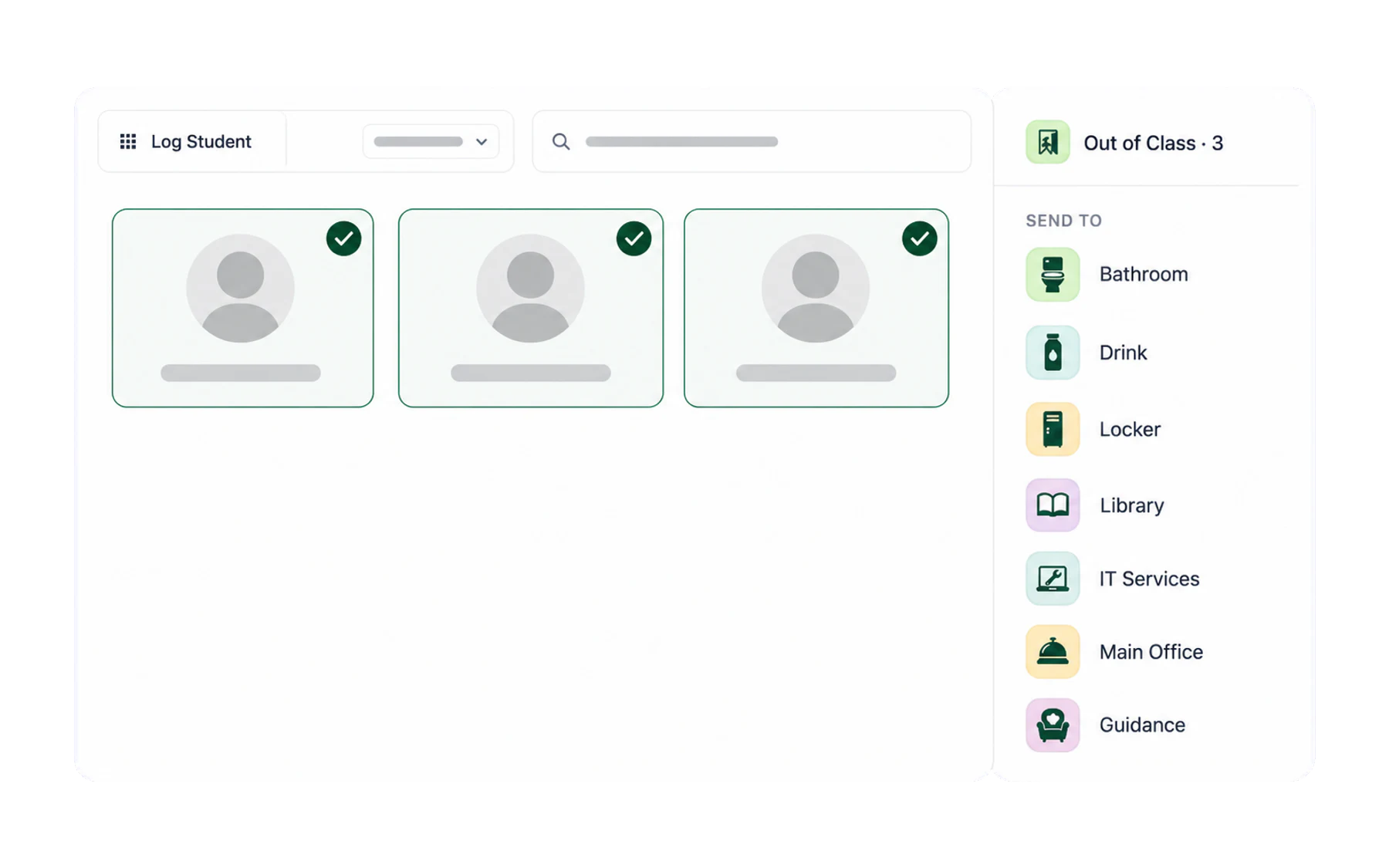
Removing someone before you commit
Tap a name in the selected list — or the student’s card in the grid — to take them out again. Nothing is created until you choose a destination, so there is no cleanup to do if you change your mind.
Groups that leave often
For a group that goes out every week at the same time, the honest advice is that this is still the fastest way — Vero has no saved-group shortcut for passes. What it does have is the record: a term of Thursday-period-4 departures shows up clearly in Insights, which is often the more useful conversation to have with a timetabler.
A caution about bulk selection
Selecting a whole class and sending them all is possible, but it makes the pass register less useful, not more: a pass is meant to mean “this student left the lesson while it continued”. If a whole class moves, that is the timetable, not movement. Leave those unrecorded.